
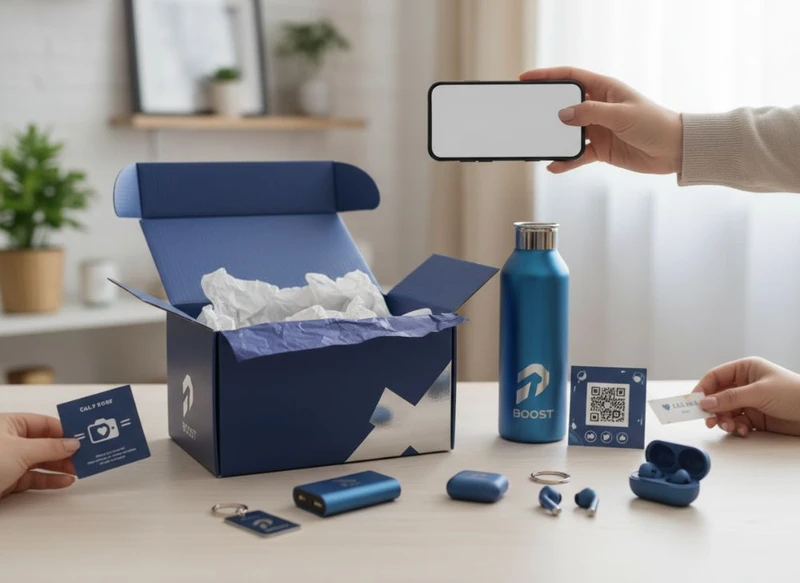
Custom packaging can extend a brand’s social presence beyond the screen by giving customers a clear reason to photograph, film or share their order. The most effective approach is not simply adding a logo to a box. It is designing one or two deliberate sharing moments, pairing them with an easy call-to-action, and measuring what happens afterwards.
For South African brands, social-ready packaging should also work in the real world: it must protect the product, suit the sales channel, remain legible under ordinary lighting and fit the budget. This guide to boost brand visibility: integrating social media with custom packaging explains how to make each packaging element earn its place.
Encouraging Photo Shares with Great Unboxing
An unboxing experience is shareable when it creates a sequence worth revealing. The customer should see something appealing before they reach the product, then find one or two considered details inside. Too many layers can feel wasteful or frustrating, particularly for routine e-commerce orders.
A practical unboxing sequence may include:
- A recognisable outer box or mailer.
- A neat first reveal, such as branded tissue, a printed inner panel or a carefully placed product card.
- A short message that reflects the product’s purpose or the occasion.
- A visible prompt to tag the brand or use a campaign hashtag.
- Packaging that keeps the product presentable when photographed.
The strongest visual detail is often a simple contrast: a plain exterior that opens to a bold interior, for example. This gives the customer a reveal without requiring costly decoration on every surface.
Before approving a design, inspect a physical sample rather than relying only on a screen proof. Check whether text remains readable, colours reproduce appropriately, inserts sit securely and the opening experience still feels tidy after normal handling. Also confirm that the chosen board, coating and construction suit the product’s weight, shape and storage needs.
Avoid asking customers to share before you have given them something worth sharing. A generic “tag us” line has limited impact if the package itself is indistinguishable from every other parcel.
Using Label Stickers as a Call-to-Action
Stickers are a flexible, relatively contained way to add a social prompt without redesigning an entire box. They can be applied to a seal, an insert, a product wrap or an outer carton, depending on where the message is most likely to be seen.
A useful call-to-action sticker should contain one primary action. Examples include:
- “Show us your setup and tag @yourbrand”
- “Scan for the colour guide”
- “Share your gift moment with #YourCampaign”
- “Open, style, share”
- “Vote for the next release”
Keep the wording direct and make the benefit clear. Customers are more likely to participate when they understand what they will receive in return, such as entry into a draw, a chance to be featured, styling ideas or access to useful product information.
For short-run activations, custom printed stickers can be especially useful because the campaign message can change while the main packaging format remains consistent. Confirm the adhesive for the application surface and storage conditions. A label that lifts on textured board, rubs off easily or obscures essential product information can undermine the experience.
Do not place a social sticker where it interferes with mandatory product details, handling instructions, barcodes or retailer labelling requirements. Requirements vary by product category and sales channel, so these must be checked before production.
Creating Shareable Gift Packaging Moments
Gift packaging naturally lends itself to social content because it marks an occasion and involves both a giver and a recipient. However, shareability should support the gift experience rather than overpower it with branding.
Useful gift-packaging features include:
- A space for a handwritten name or short note.
- A message beneath a lid, sleeve or seal.
- A coordinated box, tissue and card that look intentional together.
- A reusable rigid box or pouch where it makes commercial and practical sense.
- A subtle prompt inviting the recipient to share the reveal.
A gift box does not need excessive finishes to feel special. Consider the product category, recipient and retail environment first. For instance, a premium item may benefit from restrained typography and a tactile finish, while a celebratory product may suit brighter colour, pattern or a playful opening message.
When choosing gift packaging, ask for guidance on construction options, print areas, closure style and whether the packaging will be packed by hand or through a repeatable process. A complicated assembly can create inconsistency, slow fulfilment and reduce the polished look that makes an unboxing film well.
Gift campaigns also need a clear boundary between a permanent brand element and an event-specific message. Build the main packaging around the brand, then add seasonal stickers, sleeves or inserts for limited occasions. This reduces the risk of obsolete stock after a campaign ends.
Adding QR Codes to Boxes for Contests
QR codes connect a physical package to a digital action without forcing the customer to search for a link manually. They work best when the destination has a clear purpose and is optimised for a mobile device.
A QR code on packaging could lead to:
- A competition or giveaway entry page.
- Product setup, care or usage guidance.
- A social filter, playlist or campaign landing page.
- A gallery of customer submissions.
- A product-registration or feedback form.
- A page explaining how to take part in a user-generated content campaign.
For a contest, state the essential terms clearly at the scan destination, including eligibility, closing details, entry method and how winners will be contacted. Confirm the applicable requirements for your campaign, customer data collection and promotional activity before launch.
QR code design checks
A QR code is functional artwork, not merely a decorative square. Test it from a printed packaging sample, using more than one phone and under typical lighting. Review these points:
| Check | Why it matters |
|---|---|
| Adequate size | Tiny codes are harder to scan, especially on curved or textured surfaces. |
| Strong contrast | Low contrast can make a code unreadable after printing. |
| Clear quiet space | Crowded graphics around the code can disrupt scanning. |
| Flat placement | Folds, seams, corners and heavy creases can distort the code. |
| Mobile-ready destination | A successful scan is wasted if the page loads slowly or is difficult to use. |
| Plain-language prompt | Customers need to know what they get by scanning. |
Use a trackable destination if measurement is important, but avoid using codes that lead only to a generic homepage. The digital experience should match the message printed on the box. If the box promises contest entry, the first screen should clearly support contest entry.
User-Generated Content from Packaging
User-generated content (UGC) is customer-created imagery, video, comments or posts featuring a product or brand. Packaging can encourage it, but it cannot force it. The best strategy is to remove friction and offer a prompt that gives people a creative starting point.
Instead of a vague request to “share your purchase”, try a prompt related to how the product is used:
- Show your before-and-after result.
- Share how you styled it at home.
- Film the gift recipient’s reaction, with their permission.
- Choose your favourite detail and explain why.
- Post your version of a themed challenge.
Keep campaign language consistent across the box, website, social profiles and paid content. If you use a hashtag, make it distinctive enough to separate brand entries from unrelated posts. Search the hashtag before committing to it, as an already crowded or inappropriate tag can make curation difficult.
It is also important to distinguish between encouraging a post and reusing it. If a brand wants to repost customer content in advertising, product pages or other marketing, it should obtain appropriate permission and follow the terms communicated to participants. Do not assume that a public tag automatically grants unrestricted rights to use someone’s photo or video.
A small printed insert can help here. It can explain the creative brief, link to participation terms and provide a QR code for submissions without overwhelming the outer package.
Designing Boxes to Be Visually Instagrammable
“Instagrammable” packaging is packaging that photographs well at a glance. The principle applies to any visual social platform: the shape, colour, typography and opening reveal should be easy to recognise in a customer’s image or short video.
Start with a focused visual hierarchy:
- One recognisable brand cue: a colour, pattern, symbol or typography treatment.
- One hero area: usually the lid, front panel or inner reveal.
- One detail for close-up shots: a message, texture, illustration or seal.
- One unobtrusive social prompt: placed where it supports rather than competes with the design.
For a product that will be shipped, the outside of the carton may get scuffed or covered by fulfilment labels. In that case, put the most photographable elements inside the package or on a separate product box. For in-store retail, the front-facing panel and shelf visibility may deserve more attention.
Custom boxes can be specified around both product protection and presentation. When comparing options, assess dimensions, opening style, insert requirements, board suitability, print coverage and whether a separate outer shipping carton is needed. A beautiful display box should not be expected to solve every transit-protection challenge by itself.
Common visual mistakes include:
- Using too many messages on one panel.
- Choosing pale text over a busy image.
- Making the hashtag too small to read in a photo.
- Treating a digital mock-up as proof of printed colour and finish.
- Adding delicate embellishments to a package likely to face heavy handling.
- Using a short-lived social platform reference on packaging intended to remain in circulation for a long time.
Influencer Marketing and Packaging
Packaging can make influencer content more coherent by giving creators a clear visual asset and a useful story to tell. The goal is not to script every frame; it is to provide a package that makes the product easy to introduce and reveal.
For a launch or seeding campaign, consider whether the package needs:
- A concise creator brief or product information card.
- A visible campaign name or code.
- A clear opening order that works on camera.
- A product insert that prevents items shifting in transit.
- A QR code linking to approved product information.
- A neutral background area suitable for photography.
Choose packaging complexity according to the relationship and campaign purpose. A highly elaborate presentation box may be appropriate for a selected launch list, but it may be impractical for every customer order. The branded elements that matter most should be scalable across both influencer and customer packaging where possible.
Be transparent about promotional relationships and ensure creators follow the disclosure expectations relevant to their channels and audience. Packaging should not make claims that cannot be substantiated, and any usage instructions or warnings should remain clear even when the package is designed for visual impact.
A useful briefing question is: “What should a creator understand within the first ten seconds of opening this?” The answer might be the product benefit, a new colourway, a gifting story or the campaign action. If the answer is unclear, simplify the packaging message.
Measuring Social Engagement from Unboxing
Measure the whole journey, not just likes. A social-ready packaging campaign can be assessed from scan through to submission, repost permission and repeat engagement.
Set a baseline before launching, then select a small number of metrics that connect to the campaign objective.
| Objective | Packaging mechanism | Useful metric |
|---|---|---|
| Increase brand discovery | Hashtag or creator-friendly unboxing design | Number and quality of tagged public posts |
| Drive campaign participation | QR code to entry page | Scans, completed entries and completion rate |
| Build a content library | UGC prompt and consent process | Approved reusable customer submissions |
| Improve product education | QR code to product guide | Guide visits and engagement on the destination page |
| Encourage repeat interaction | Insert with post-purchase prompt | Repeat visits, redemption or follow-up submissions |
Use distinct QR destinations or campaign parameters for different packaging versions, channels or creative concepts. This lets you compare what generated interest without assuming that all engagement came from the same source.
Qualitative review matters too. Look at whether customers show the intended panel, understand the prompt and mention the product in the way you expected. Comments can reveal that a message is confusing, a code is difficult to find or a packaging feature is especially appreciated.
Do not treat every scan as a sale or every social post as positive brand value. Review the full context, including the quality of posts, completion of the desired action, customer feedback and the operational cost of producing the packaging.
A Practical Packaging-and-Social Checklist
Before committing to production, check the following:
- Is the campaign objective specific: awareness, entries, education, UGC or gifting?
- Does the packaging contain one clear social action rather than several competing ones?
- Will the branded visual still look good after ordinary handling?
- Has the QR code been tested from a physical printed sample?
- Does the destination work well on a phone?
- Are campaign terms, permissions and data-handling requirements confirmed?
- Is the call-to-action visible without hiding product or retailer information?
- Can the packaging be assembled consistently at the expected order volume?
- Have you chosen tracking methods that distinguish packaging results from other marketing?
- Is there a plan for remaining campaign packaging after the activation ends?
FAQ
Should every package include a QR code?
No. Add a QR code only when it leads to a valuable mobile experience. If there is no useful destination, a simple branded message or social handle may be more effective and less distracting.
Is a hashtag enough to generate user-generated content?
Usually not. A hashtag makes content easier to find, but the package also needs an appealing visual moment or a specific invitation that gives customers a reason to post.
How should a business balance sustainable choices with a premium unboxing experience?
Prioritise purposeful materials, right-sized construction and minimal unnecessary layers. A thoughtful opening sequence, clear design and reusable elements can create a premium impression without relying on excessive packaging.
What should be confirmed with a packaging supplier?
Confirm dimensions, product fit, construction, print areas, material options, finishes, assembly needs, sample process and any artwork requirements. For campaigns, also confirm how variable details such as QR codes, inserts or stickers will be managed.
A strong social packaging programme starts with one clear customer action and a box that supports it naturally. When you are ready to translate the concept into a physical format, review the available packaging printing options and prepare a brief covering product dimensions, distribution channel, campaign message and QR or sticker requirements.
